
A customer writes that your site sent them to a casino page. Or Google shows "This site may be hacked" under your name. Or you open Users in WordPress and there's an administrator called something like "wpadmin2" that nobody on your team created. Or the password you've used for three years suddenly doesn't work.
Many of the guides you'll find for this are written by companies selling a security plugin, or by developers for developers. This one is for the person who owns the site and has to decide what happens next. Here is the first hour, in order, with the parts you can do yourself and the parts where you should stop and hand it over.
Minute 0 to 5: write down what you see
Don't start deleting things. The first useful step, and the one the official WordPress guide on hacked sites puts first after "stay calm", is to write it down: what you saw, when you noticed it, and what changed on the site recently (a new plugin, a theme update, a new person with a login). Whoever cleans the site will ask for exactly this, and it often points straight at the way in.
Then match the symptom. It tells you what kind of hack you're dealing with and where to look first.
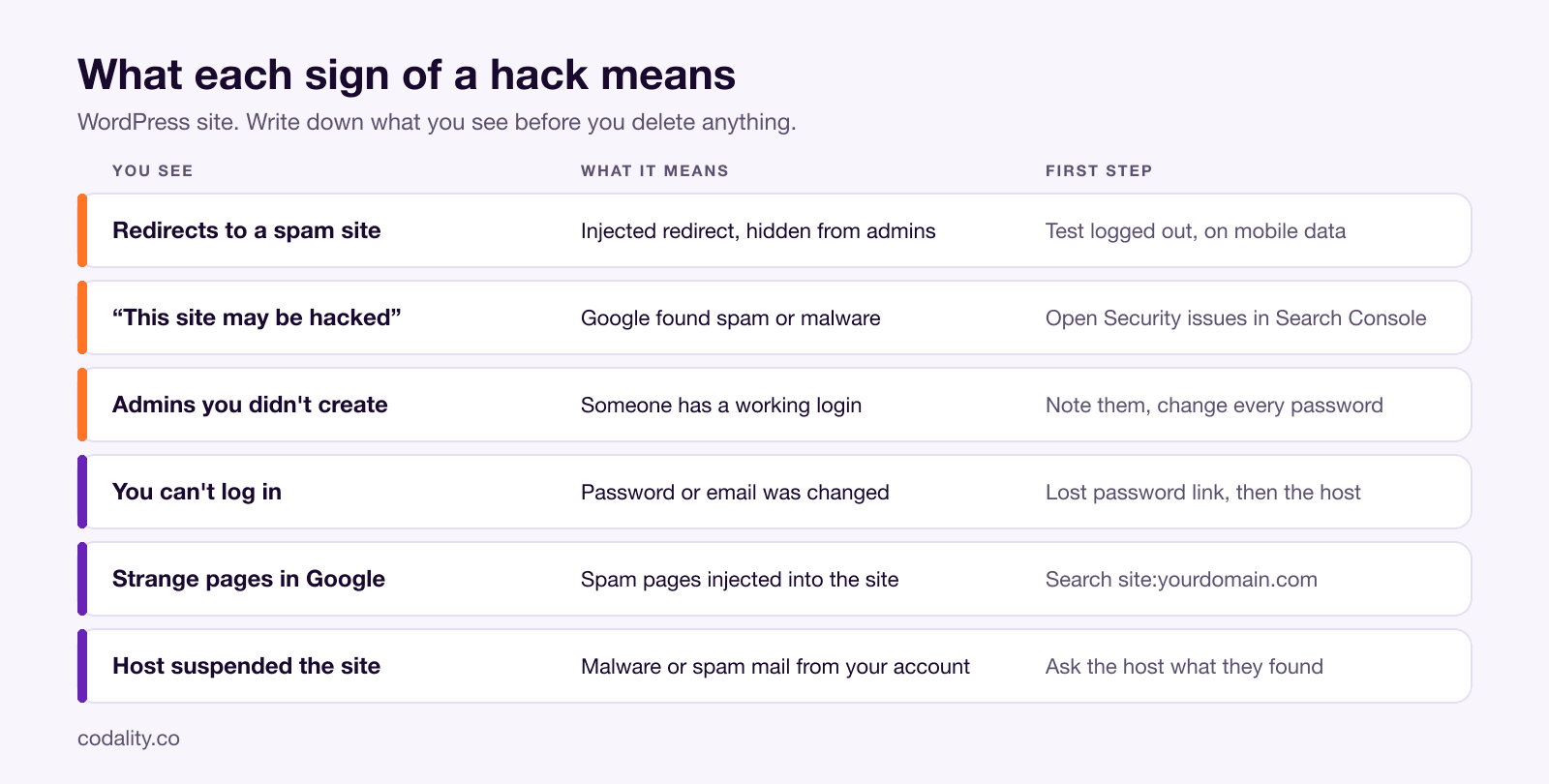
Visitors get sent to a spam, casino or pharmacy site. That's a redirect hack: code planted in your files or database that sends people elsewhere. The awkward part is that you often won't see it. Many redirect infections fire only for visitors who arrive from Google or open the site on a phone, and they stay quiet for anyone logged into WordPress. Check from a phone on mobile data, in a private window, by searching your business name and clicking your own result. If it redirects there and not on your laptop, that's the cause, not a fluke.
Google shows "This site may be hacked", or Chrome shows a red warning page. Google found spam pages or malware on the site. Open Search Console and look at Security & Manual Actions > Security issues. It lists the problem and sample URLs. Leave it open in a tab: you'll come back to it at the end. Don't click Request Review yet.
Administrator accounts you didn't create. Someone has, or had, a working login. Don't delete them yet. Write down the usernames, emails and dates first, because that's evidence of when it started.
You can't log in. Your password or email was changed, or your user was removed. Try "Lost your password?" first. If the reset email never arrives, the attacker probably changed your address. Your host can reset it directly in the database through phpMyAdmin, and that's a 5-minute ticket for them. Before you assume a hack, though, check whether you can log in at all and see a white screen or "critical error" after it. That's often an update gone wrong, and we covered it in WordPress broke after a PHP update.
Strange pages in Google that you never wrote. Type site:yourdomain.com into Google. Pages in Japanese, pages selling pills or replica watches, hundreds of URLs you don't recognise: that's injected spam content, and it's there to borrow your domain's reputation.
The host suspended the site or your emails started bouncing. Hosts do this when they detect malware or spam sent from your account. Hacked sites often send spam mail, and the server's address ends up on blocklists, which is why your normal email suddenly fails too.
Minute 5 to 15: close the site and take a copy
Two things, in this order.
Take the site off the air. A maintenance-mode plugin works if you can still get into wp-admin, but it's not enough on its own, because the malicious code may run before the plugin does. The cleaner way is to ask the host to block public access in cPanel or Plesk or put the site behind a password while you work. Yes, you lose traffic for a few hours. The alternative is your customers' browsers being sent to malware with your name on it, and Google's warning getting worse.
Make a full copy of the infected site. Files and database, downloaded and stored somewhere apart from the server, and labelled clearly as infected. It sounds backwards, but the WordPress guide recommends it for good reason: if a cleanup goes wrong you still have the site's content, and whoever investigates can look at the original files to find how they got in. Never restore from this copy.
Minute 15 to 30: take the keys back
Now lock everyone out, including the attacker, and let only your people back in.
- Check your own computer first. The official WordPress guide points out that many hacks start with malware on the owner's laptop that captures FTP and admin logins. Run a full antivirus scan on Windows or macOS, or do the next step from a different machine you trust.
- Change every password, not only WordPress. The hosting control panel, SFTP or FTP accounts, the database user, the email account that receives admin mail, and every WordPress user with Administrator or Editor rights. Long, unique, generated by a password manager such as 1Password or Bitwarden.
- Log everyone out. WordPress keeps people logged in with secret keys stored in
wp-config.php. Replace them with a fresh set from the official generator at api.wordpress.org/secret-key/1.1/salt/ and every session ends, the attacker's included. If you don't want to edit files, ask the host or your developer; it's a two-minute job. - Go through Users. Filter by Administrator. Anyone you don't recognise: note the details, then remove the account. Check the remaining admins too; attackers sometimes change the email of an existing account instead of creating a new one.
- Turn on two-factor login for every admin if you don't have it. Wordfence, Solid Security and Two Factor are free plugins that do it with Google Authenticator or a similar app.
Expect to change the passwords again later. Doing it now stops new damage, but if anything malicious is still on the server it can capture the new ones. WordPress's own advice is to change them a second time once the site is clean.
Minute 30 to 45: tell the host
Open a ticket or call, and say plainly that the site is compromised. The host is useful here in four ways. On shared hosting the hack may reach other sites on the same server, and they need to know. They have server logs that show which files changed and when. Many keep their own backups going back days or weeks, and those backups don't depend on anything inside your WordPress. And they can confirm whether what you see is a hack at all or a problem on their side.
Ask them directly: when did files on the account last change, which backups do they hold and from which dates, and did they see anything in the logs. Their answer decides the next step.
Minute 45 to 60: decide between restore and clean
This is where the owner's job turns into a developer's job. You don't have to do it, but you should know what you're paying for and why the cheap shortcut fails.
Restore from a clean backup if you have one from before the first sign of trouble, and you know roughly when that was. It's the fastest way back. Two catches. The backup has the same hole the attacker used, so the site must be updated right after the restore, before it goes public again. And the attacker may have been inside for weeks before anything was visible, so "the day before I noticed" isn't always clean.
Clean the current site if there's no reliable backup. Done properly, that means:
- Replacing WordPress's own folders,
wp-adminandwp-includes, with fresh copies of the same version from wordpress.org. Not with the "reinstall" button in the dashboard, which only overwrites existing files and leaves behind any new files the attacker added. - Checking every remaining core file against WordPress's official checksums, which flags anything that was modified.
- Sorting files by modification date and reading everything that changed around the time of the attack. The
uploadsfolder should hold images and documents; a PHP file in there is a red flag. - Reading the files attackers like most:
.htaccess,index.php, and the theme'sheader.php,footer.phpandfunctions.php. - Reinstalling every plugin and theme from the official source, removing the ones you don't use, and replacing anything that came from a "free premium theme" site.
- Checking the database: the site address settings that redirects often rewrite, posts with injected scripts, and options nobody added.
A scan with Wordfence or Sucuri, or a remote check on VirusTotal, is a good start. It isn't the end. Scanners find known patterns, and a clean scan on a site that was hacked last week proves less than it seems.